

Im Alltag
Aktualisiert am 30. September 2026Settings, updates and performance
Language, double-click action, editor per extension, transfer parallelism, local log and updates.
Settings open from the gear icon in the top right. They are specific to each computer.
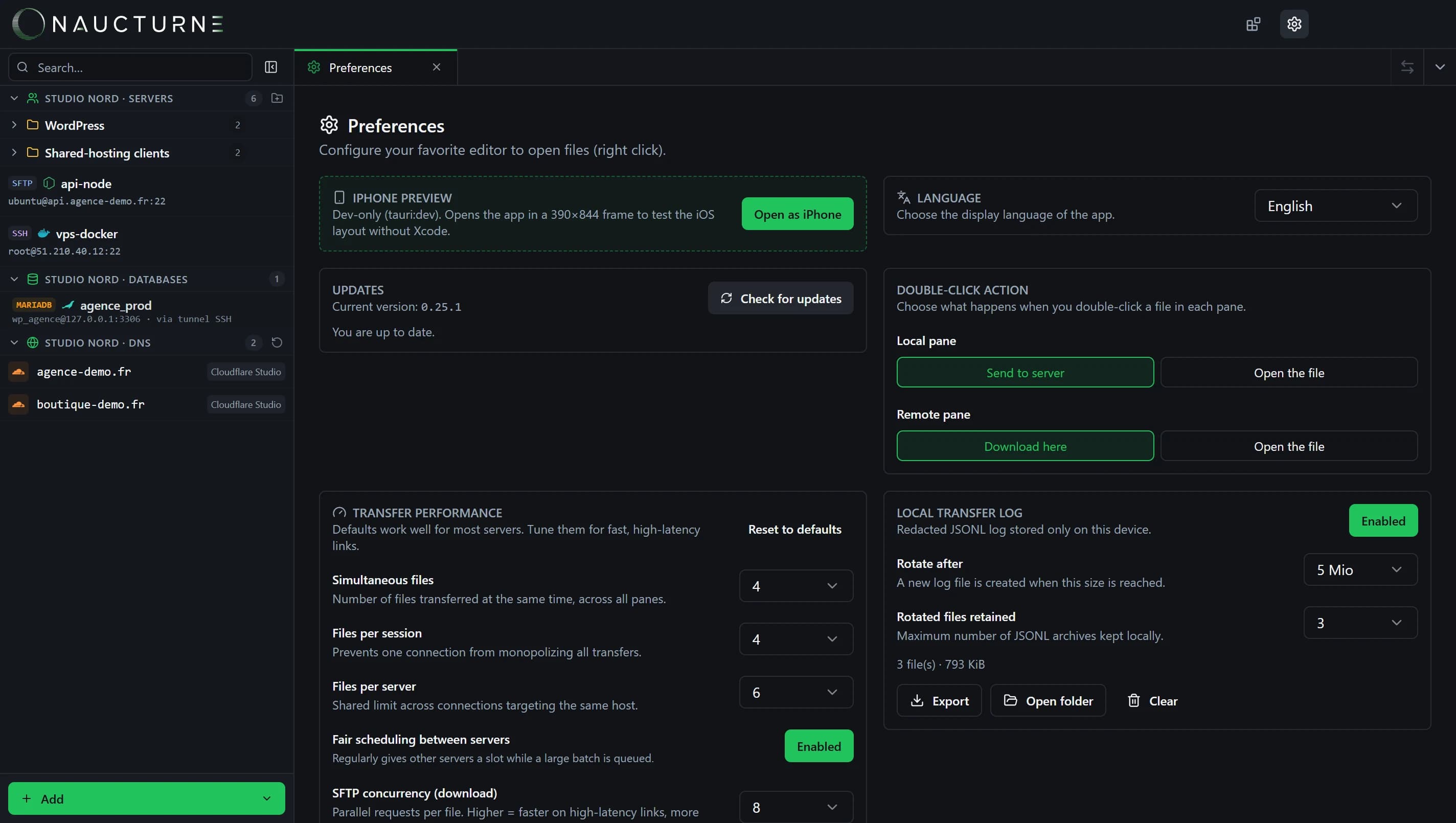
General
- Language: English or French.
- Updates: manual check and installed version. Updates are signed and install in one click.
- Double-click action: for each pane, transfer the file or open it in an editor.
- Editor per extension: for example map
.phpto VS Code and.mdto another editor. An opened remote file is uploaded back to the server every time you save.
Transfer performance
Defaults suit most servers. On a fast link, increase:
- concurrent files (overall, per session and per server);
- fair scheduling between servers, so one large batch doesn't hold up the others;
- SFTP concurrency and chunk size, or the number of extra FTP connections.
Local transfer log
A redacted JSONL log (no secrets) is kept on your computer only, with automatic rotation. You can export it for troubleshooting, open its folder or clear it.
Native engine
Since version 0.22, SSH, SFTP, FTP, FTPS and S3 transfers run through a native engine written in Rust: a lighter installer and lower memory use.
Keine Antwort gefunden?
Unser Team beantwortet jede Frage, jeden Fehlerbericht und jeden Vorschlag.