

Manage Proxmox VMs and Containers over SSH Without Copying IPs
Turn every Proxmox VE container and VM into an SSH site automatically, with a read-only API token, direct, bastion or NAT access, and a list that stays in sync.
A Proxmox cluster changes all the time: a new container for a client project, a VM cloned for testing, an IP reassigned by DHCP. Keeping an SSH client in sync by hand means copying addresses from the web UI, guessing which entry is stale and deleting sites for machines that no longer exist.
Naucturne reads the Proxmox API instead and treats the cluster as the source of truth.
What you need
- A Proxmox VE node reachable from your computer (the API usually listens on port 8006).
- An API token: Datacenter → Permissions → API Tokens, with the PVEAuditor role on
/, propagated. - The way you normally reach guests over SSH: user, key or password.
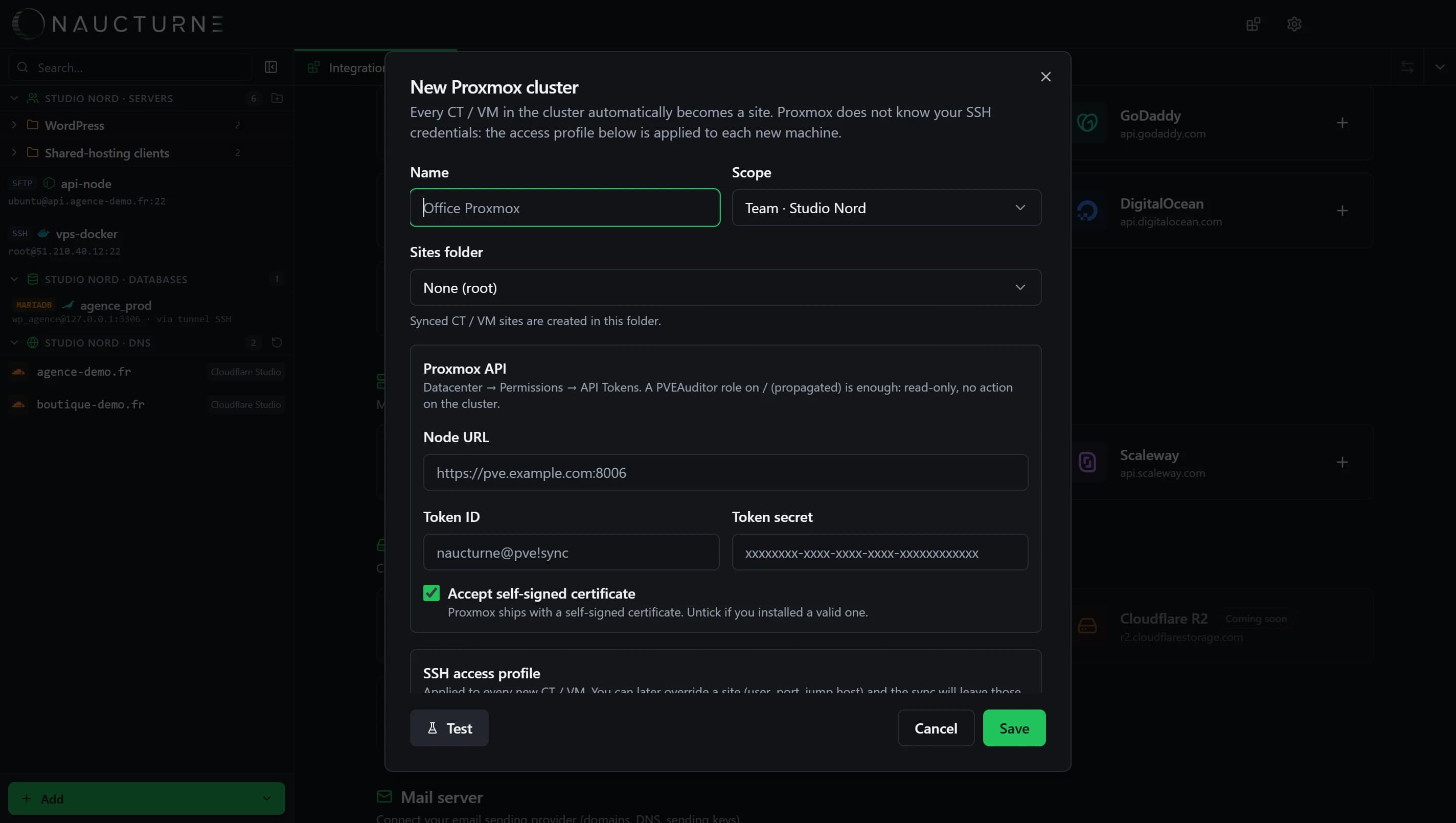
Pick the access mode that matches your network
| Preset | When to use it | Site host | Notes |
|---|---|---|---|
| Direct | Each guest has an IP reachable from your computer | IP detected by Proxmox | Simplest setup, typical on a flat LAN or VPN |
| ProxyJump | Guests live on a private bridge | Private IP, through a bastion | The bastion is often the Proxmox node over SSH |
| NAT | One public IP forwards a port per guest | The shared host | Set the exact SSH port per site afterwards |
IP detection relies on what Proxmox knows: the QEMU guest agent for VMs, the network configuration for containers. Install the guest agent on VMs that don't report an address.
What the sync does, and what it never does
- New guest → new site, created in the folder you chose, with your access profile.
- Changed IP or name → updated site. Fields you override by hand on a site (user, port, relay) are left alone afterwards.
- Deleted guest → site removed. Removing the cluster from Naucturne keeps the sites as regular entries.
- Never: start, stop or modify a guest. The token is read-only by design.
Shared passwords
If your profile uses a password, the same password is copied to every new site. Prefer SSH keys, or the system keys option (~/.ssh and your SSH agent).
From sites to real work
Once synced, a Proxmox guest is a site like any other: open the dual-pane to move files, the SSH terminal to run commands, attach a MariaDB or PostgreSQL profile through an SSH tunnel, or open the machine in Cursor or VS Code over Remote-SSH. In a team, share the cluster: everyone gets the same up-to-date list, encrypted end-to-end.
When Naucturne is not the right tool
Naucturne is not a Proxmox management console. Creating guests, snapshots, backups, storage and HA stay in the Proxmox web UI or pvesh. Naucturne focuses on what happens after a guest exists: reaching it, editing it and sharing access to it.
Set it up with the hosting providers guide, or read the Proxmox integration page.
Frequently asked questions
Does Naucturne need write access to my Proxmox cluster?
No. A read-only API token with the PVEAuditor role on / is enough. Naucturne only reads the inventory and IP addresses; it never starts, stops or changes a guest.
How do I reach containers on a private network?
Choose the ProxyJump preset: Naucturne connects to each guest's private IP through a bastion, often the Proxmox node itself over SSH. A NAT preset covers setups with one public IP and a port per machine.
What happens when I delete a VM?
Its site is removed at the next sync, which runs every 45 seconds. If the API is unreachable or returns an empty inventory, nothing is deleted.